Run the best local LLM your PC can handle, in one command.
localllm checks your GPU and RAM, picks the most accurate model we have measured for your
language that fits the card, and runs it on llama.cpp with settings we profiled. Free, offline after the first
download, and your chats never leave your PC.
$ pip install make-localllm-easier
$ localllm
Python 3.9+, or the single file for Windows, macOS or
Linux. Models from 2.7 GB (4-6 GB cards) up to 13 GB; localllm doctor tells you what fits on yours.
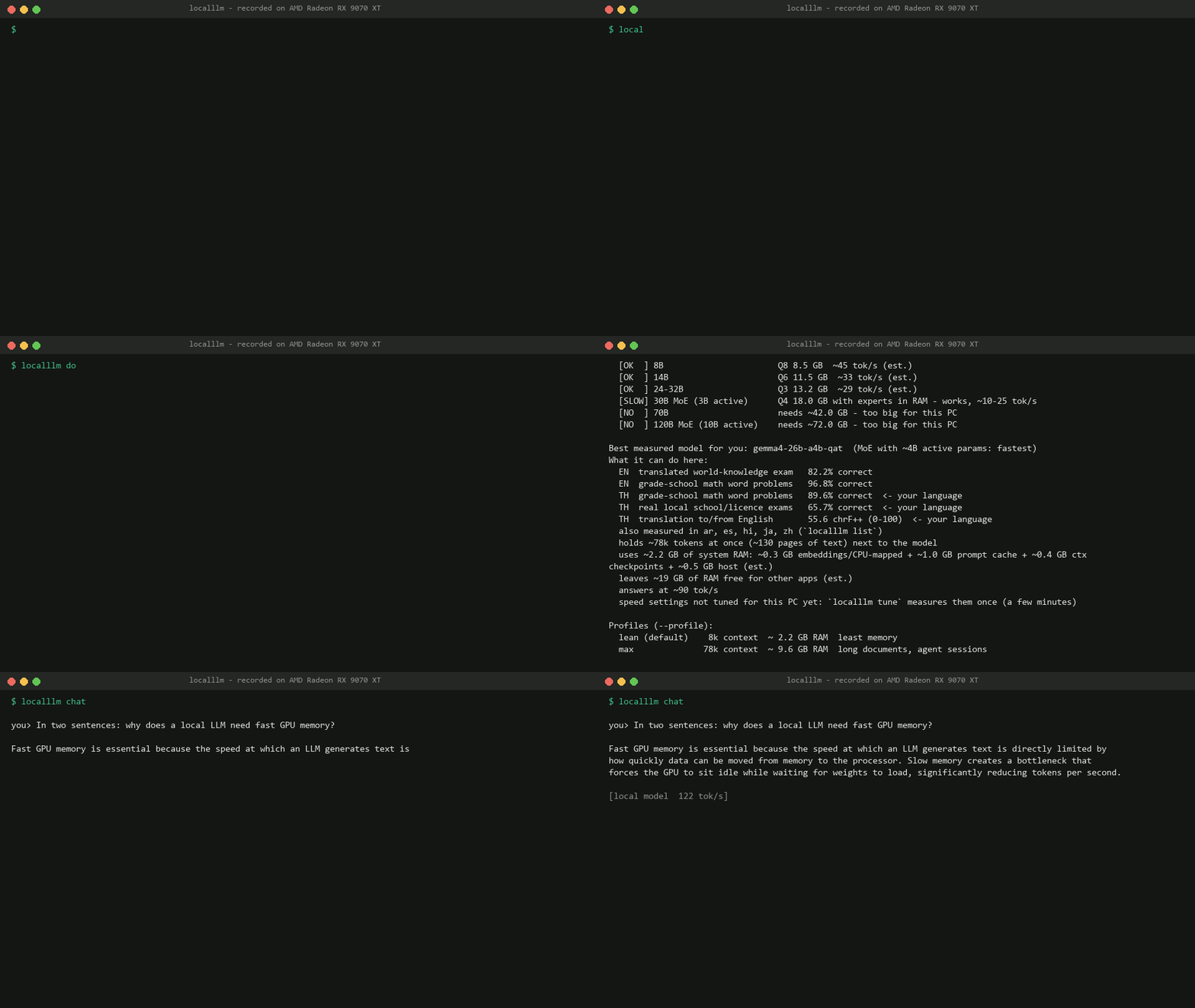
$ localllm doctor
GPU AMD Radeon RX 9070 XT  15.9 GB  (640 GB/s)    RAM 32 GB    language: th
Tested: Windows/AMD: tested by maintainers

Model sizes for this PC (whole model on the GPU = fast):
  [OK  ] 4B                       Q8 4.2 GB  ~90 tok/s (est.)
  [OK  ] 8B                       Q8 8.5 GB  ~45 tok/s (est.)
  [OK  ] 14B                      Q6 11.5 GB  ~33 tok/s (est.)
  [OK  ] 24-32B                   Q3 13.2 GB  ~29 tok/s (est.)
  [SLOW] 30B MoE (3B active)      Q4 18.0 GB with experts in RAM - works, ~10-25 tok/s
  [NO  ] 70B                      needs ~42.0 GB - too big for this PC
  [NO  ] 120B MoE (10B active)    needs ~72.0 GB - too big for this PC

Best measured model for you: gemma4-26b-a4b-qat  (MoE with ~4B active params: fastest)
What it can do here:
  EN  translated world-knowledge exam   82.2% correct
  EN  grade-school math word problems   96.8% correct
  TH  grade-school math word problems   89.6% correct  <- your language
  TH  real local school/licence exams   65.7% correct  <- your language
  TH  translation to/from English       55.6 chrF++ (0-100)  <- your language
  also measured in ar, es, hi, ja, zh (`localllm list`)
  holds ~78k tokens at once (~130 pages of text) next to the model
  uses ~2.2 GB of system RAM: ~0.3 GB embeddings/CPU-mapped + ~1.0 GB prompt cache + ~0.4 GB ctx checkpoints + ~0.5 GB host (est.)
  leaves ~15 GB of RAM free for other apps (est.)
  with --embeddings: + ~0.2 GB RAM for multilingual-e5-small on the CPU, no VRAM (est.)
  answers at ~90 tok/s
  speed settings not tuned for this PC yet: `localllm tune` measures them once (a few minutes)

Profiles (--profile):
  lean (default)    8k context  ~ 2.2 GB RAM  least memory
  max              78k context  ~ 9.6 GB RAM  long documents, agent sessions
What it does, in 60 seconds
- Install.
pip install make-localllm-easier, or the single file for Windows, macOS or Linux. Then runlocalllm. - It reads your PC. GPU, VRAM, RAM and your language. It shows what fits and asks before any big download.
- It picks by measurement. The most accurate model we have tested in your language that fits your card, started with settings sized to your RAM.
- You chat. A small starter model answers in about a minute while the best one downloads; it takes over between answers. Same port for apps: OpenAI, Anthropic, Ollama and Gemini APIs.
eval covers 23 languages and exams from 44 countriesWhat it does for you
Choosing a local model usually means reading benchmark threads, guessing a quantization and finding out later that it is slow, too big, or weak in your language. localllm does that part from measurements.
Picks from measured scores
Every model in the catalog was run through real exams in several languages on our test PC. The pick is the most accurate one that fits your card; near ties go to the faster model.
Your language, not only English
Scores are kept per language. A Thai user and a Spanish user can get different models. 2-bit quants are flagged: they cost Thai, Hindi and Arabic about 13 points.
Less RAM, same speed
llama.cpp's defaults keep up to 8 GB of prompt cache in system RAM. localllm sizes the caches to your PC: about 4x less RAM in the same chat, same tok/s.
Works with the apps you have
One endpoint at
127.0.0.1:8080 speaks four APIs, with tool calling and images. localllm connect sets up
Hermes, OpenCode, Claude Code, Codex, Aider or Obsidian.
4x less RAM in a long chat
Same 30-turn chat, same model, same speed. The difference is cache sizing: llama-server's defaults keep an 8 GiB prompt cache and 32 conversation checkpoints in system RAM, so memory keeps growing while you talk. Measured on an RX 9070 XT with 32 GB RAM.
Who it is for
You want AI on your own PC
Private by default. After the first download it runs offline.
You don't work in English
Thai, Japanese, Chinese, Hindi, Arabic, Spanish are measured today. Others can be measured with one command.
You have an AMD or Intel GPU
Vulkan builds, and the Windows Resizable BAR fix applied where it measured faster.
You build things
A local API that existing SDKs already speak, for prototypes, scripts and coding agents.
How it works
- Checks your PC. GPU, VRAM, memory bandwidth, system RAM, your language.
- Picks a model. The most accurate measured model that fits with room for an 8k-token conversation.
- Downloads and verifies. llama.cpp and the model, each checked against a pinned SHA-256.
- Starts it. A chat page in your browser and an API for your apps.
Compared with what you may use now
| localllm | Ollama / LM Studio | llama.cpp yourself | |
|---|---|---|---|
| Which model? | Picked from measured scores for your language | You choose | You choose |
| Settings | Profiled per model, tune per PC | Their defaults | All yours |
| Interface | Browser chat with saved chats, terminal, API | Polished apps | CLI and server |
Try it on your PC
$ pip install make-localllm-easier
$ localllm